
 In the past, the most challenging thing for truckers to do was accessing the Internet while on the road, away from a home phone line or broadband connection. Now WiFi is everywhere, and this page explains some of the newest and best methods, as well as providing helpful resources to steer you in the right direction.
WiFi: Internet Access on the Road
WiFi (short for Wireless Fidelity) allows you to have streamlined, unlimited, high-speed access to the internet without all the hassles involved with cables, telephone lines and connection kits. You must be in range of a WiFi ‘hotspot’ to access the Internet. Some of these locations offer free access, others you pay through a service like T-Mobile (by the hour, day, month, etc.). For example, many Starbucks and McDonalds retail locations are now hotspots. Other hotspot locations include airports, hotels and motels, RV parks and campgrounds, and libraries. For a comprehensive list of free WiFi Hotspot locations across the country, click here.
If you’re a trucker on the road, you can now access the Internet in the comfort and privacy of the cab of your truck. It is the newest and most exciting development for OTR drivers who rely on the Internet for both business and pleasure. With older laptops you need a WiFi compatible PC card, a small card that fits into laptops. Conveniently, the newer laptops now come with wireless capability installed.
Different Ways to Pay for WiFi
You’ll have the option of different payment plans. Monthly access is currently running around $20.00 for each of the major WiFi providers. You can also choose hourly, daily and even yearly plans. Which plan you should choose depends on how often you intend to access the Internet, and how often you frequent certain truckstops. For example, if you only get the chance to access the Internet at a Flying J hotspot a couple of times a month, you would waste money on a monthly plan. So, you only have to choose between hourly and daily. If you plan on being online for less than 3 hours, hourly would be the way to go.
Planning ahead how you’ll access the Internet will save you time and money. Taking the time to really research the options available to you will be well worth the effort.
How to Access Truckstop Wifi
At most truckstops, simply attempt to access the internet and the wireless provider of the truckstop should appear giving you options to sign up for their paid wifi service. There are several truckstops which provide access through their own WiFi network. The next section describes these hotspots.
WiFi Availability at Truckstops
Pilot/Flying J: Wireless Internet is provided by Wandering WiFi at select locations. For sales and support including starting or stopping service and technical assistance or questions, please contact Wandering WiFi at 404-478-7388.
SpeedZone: This is the service currently being use by TA and Petro Truckstops for WiFi hotspots. Click here for TA SpeedZone WiFi Access plan information and hotspot locations.
- How can I pay for Interstate SpeedZone?
When you get to the Interstate SpeedZone login page you can choose to pay online with a credit card, prepaid card, or redeem your UltraONE Points. Prepaid cards are available at the TA Travel Store for daily, monthly and annual subscriptions!
- Which TA’s and Petro’s have wireless internet? All TA and Petro full-service travel centers have Interstate Speedzone. Your account will work at any Interstate SpeedZone
WiFi Hotspot, using your selected username and password.
Mifi Wireless Internet Access
MiFi is a line of compact wireless routers produced by Novatel Wireless that act as mobile Wi-Fi hotspots. MiFi stands for ‘My Wi-Fi’. The MiFi can be connected to a mobile phone (cellular) carrier and provide internet access for up to 5 devices. The MiFi works at a distance up to 10 m (30ft) and will provide internet or network access to any WiFi enabled peripheral device.
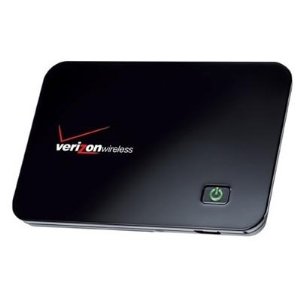
You can buy Mifi devices much cheaper if you sign up for 2 year service with one of the major cellular carriers. If you prefer to go month-to-month, 
